
Enco Documentation Tool
Maintenance procedures built from data, on your own Word template
A Windows desktop tool that produces maintenance procedures and work instructions in Word. It fills your master template from spreadsheets, rebuilds old procedures in a new master while keeping their steps, photos and reviewers' tracked changes, and drafts new procedures from a PM task list for an expert to review.
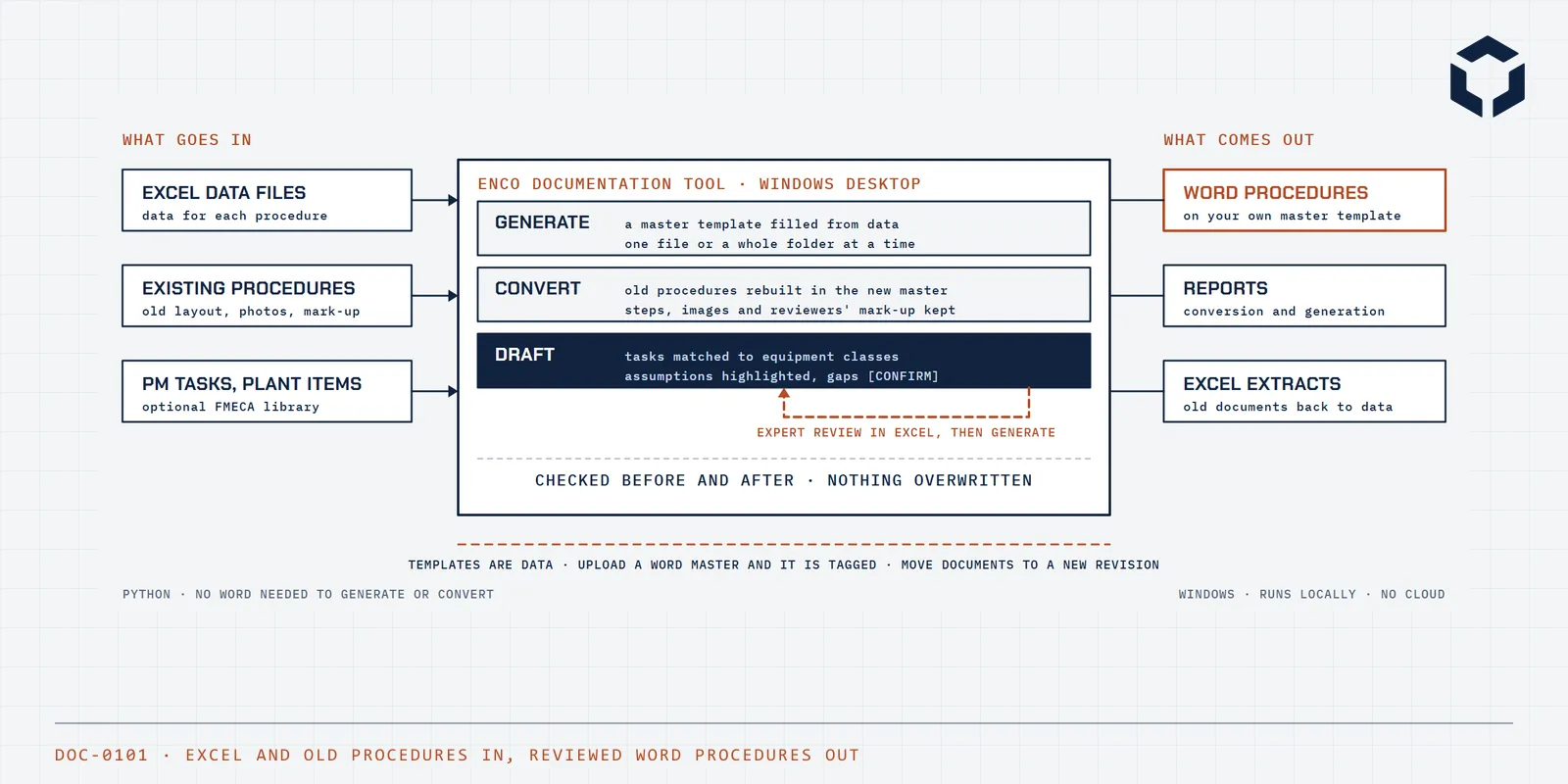
Built around one idea
Most sites hold hundreds of maintenance procedures and work instructions in Word, written over years by different people in different layouts. A new master template, a change of document numbering or a backlog of PM tasks that never had a procedure turns into months of copying and pasting, and every copy is a chance to drop a step, a photo or a reviewer's comment. The Enco Documentation Tool does that work from data, so people spend their time on the content rather than the formatting.
It works three ways. New procedures are generated from a spreadsheet into your master template. Old procedures are rebuilt in the new master, with their steps, sub-steps, photos, tables and reviewers' tracked changes carried across. And PM tasks with no procedure at all are drafted from the task list, the plant items and the site's FMECA, with every assumption highlighted for a subject matter expert to confirm before anything is issued.
Nothing is written without being checked first, nothing is overwritten, and every output is checked again after it is made. The templates are your own Word masters, uploaded and tagged by the tool, so a new revision of the master is a new template rather than new software.
What it does
Generate from Excel
Each spreadsheet becomes one Word procedure on the chosen master, one file or a whole folder at a time. Task text keeps its bullets and bold, tick-boxes for permits, critical risks and PPE are ticked from a list, and a blank data file in the right shape can be created for any template.
Convert to a new master
Old procedures are rebuilt in the new master template with their formatting, sub-steps, images and measurement tables. Each check gets its own sign-off row, isolation and de-isolation blocks take the master's standard wording with a STOP hold point, and settings such as approver, issue date and revision are applied across a whole batch at once.
Reviewers' mark-up kept
Documents out for review can be converted without losing a single redline. Tracked changes are put back under the reviewer's name and comments are re-attached, and the counts of changes and comments are checked before and after.
Move to a new template revision
When a master is re-issued, documents already on it are moved to the new revision. Template wording is updated, new rows and bullets are added next to reviewers' edits, and anything carrying a tracked change or comment is left exactly as it is.
Draft new procedures
PM tasks with no procedure are drafted in two steps. A review workbook is built first, with each task matched to an equipment class and checks and limits drawn from the FMECA, each traceable to its source. An expert reviews it in Excel, then the drafts are generated with assumed content highlighted, missing values marked to confirm, and a list of the photos still to take.
Templates
Upload a Word master and the tool tags it: metadata fields, sections, tick-box tables, the repeating task steps and references. A master is checked when it is uploaded and before each conversion, and advanced users can hand-author a template.
Extract to Excel
Existing procedures are read back into the data format of their template, as a starting point for turning documents written by hand into data the tool can regenerate. Rich formatting is flattened on the way.
Checks at every step
A pre-flight check shows what was recognised in each document before anything is written. Every output is checked for structural faults and leftover template text, a report lists each file with its warnings, files open in Word are refused, and outputs are never overwritten.
How it is built
- Word is not needed to generate or convert. Documents are built directly from the Word file format, so batches run on any Windows machine. Microsoft Word is used only where it adds something: putting reviewers' tracked changes back, and previewing the first pages of an output.
- Templates are data, not code. Each one is your own Word master and a short description of its fields, so a new master or a new revision is added without a software release.
- People stay in charge of content. Drafted content is highlighted until an expert confirms it, values the tool cannot know are marked to confirm, and the review workbook is the source of truth, so corrections survive every regeneration.
- Nothing is quietly lost. Pre-flight and post-run checks compare what went in with what came out, mark-up counts must match, and a failure is reported with its reason rather than shipped.
- Runs locally. The tool reads and writes folders on the user's machine and sends nothing anywhere, so procedures never leave the site's control.
- Kept honest by an automated regression suite that converts sample documents and checks counts, metadata, structure and an outline of every task table against a known result.
Integrations
Procedures live in Word and maintenance data lives in spreadsheets and the CMMS, so the tool works with the files a site already has rather than asking for a new system.
What connects today
Word and Excel files
Word procedures in and out, on your own master templates, and Excel for data files, review workbooks, extracts and the list of images still needed.
CMMS task exports
A PM task list and the plant items on each task, exported from the CMMS as spreadsheets, as the starting point for drafting procedures that do not yet exist.
FMECA library
A FMECA kept in a spreadsheet supplies the checks, intervals and acceptable limits for drafted tasks, each step carrying the source it came from.
Microsoft Word, where installed
Used to restore reviewers' tracked changes after a conversion and to preview the first pages of an output. Everything else works without it.
What we could add
- Templates for other document types, such as inspection and test plans, job packs or isolation procedures.
- Reading tasks and plant items straight from the CMMS instead of from exported spreadsheets.
- Publishing approved procedures into the site's document control system with their metadata.
- An equipment class library built from your own approved procedures and maintenance strategy, so drafts start from your standard wording.
How you can run it
- A Windows application delivered as a folder to unzip and run, with no Python or other software to install. Templates and settings sit beside it, where the people who own them can change them.
- Set up with your own master templates, uploaded and tagged, and checked against a sample of your existing procedures before a batch is run.
- Run by your technical writers and planners, or by Enco as a service for a conversion or drafting campaign, with the review workbooks and reports handed over with the documents.
- Supported by the engineers who wrote it.
See it working, then decide
The quickest way to judge it is a walkthrough on real workflows. Tell us what your team runs today and we will show you where this fits, or where a custom build fits better.