
ThreadCast
Weekly resource planning that keeps the forecast honest
A web application for planning an engineering team week by week. People are allocated to jobs in whole days against the days they have, the forecast of available people against project and tender demand is drawn for any window of weeks, the timesheet system is read each night, and the plan shows who comes free and when.
Built around one idea
Most engineering firms plan their people in a spreadsheet, and it works until it does not. Formulas drift, two people edit the same copy, the chart stops matching the cells, and nobody is sure whether a blank means nobody is on the job or nobody has said. ThreadCast keeps the parts of that spreadsheet that were right, the business rules and the forecast chart, and replaces the parts that silently corrupt numbers.
It holds one plan. Each person on each job gets whole days a week, nothing smaller. Capacity is contracted days minus leave. Demand is project allocations plus tender allocations. The chart draws the two against each other for whatever window of weeks the reader chooses, and every number on it can be traced to the cells it came from.
The timesheet system supplies what is already happening, which is who is employed, the jobs, who is assigned, the hours logged, each job's budget and approved leave. ThreadCast owns the forward plan. A planner's entry always wins, and a day the system worked out is drawn in pencil so nobody mistakes it for a decision.
What it does
Planner
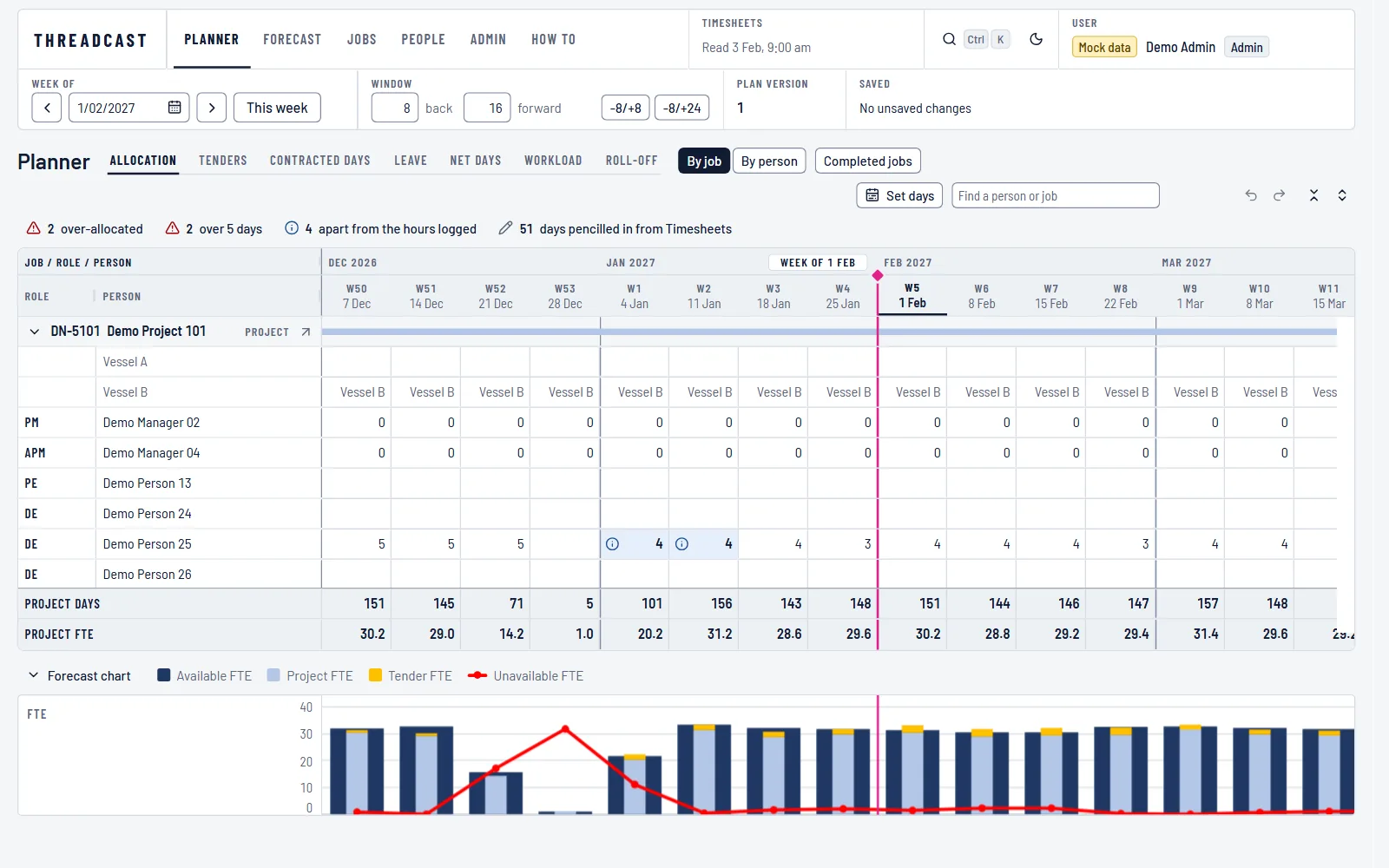
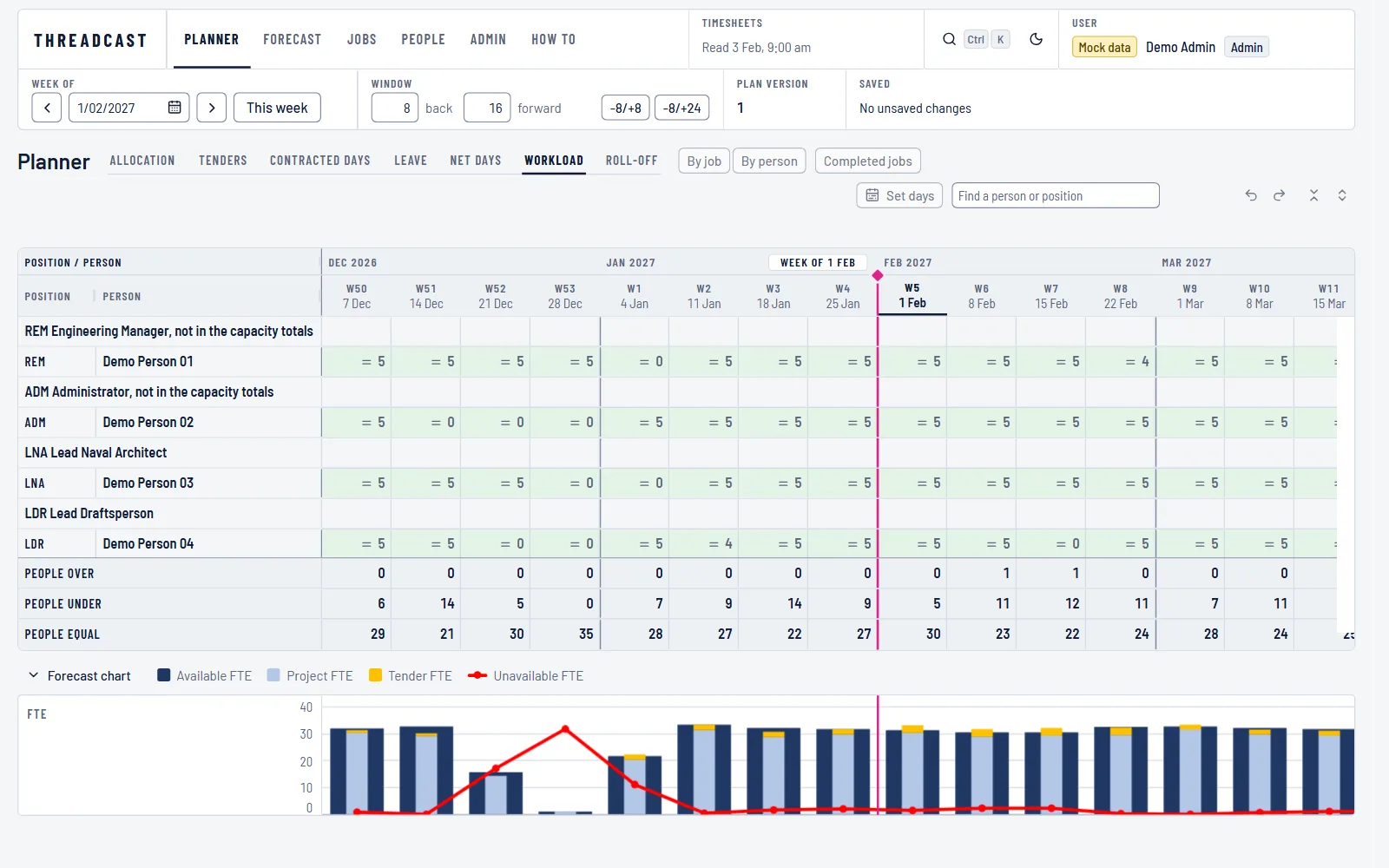
An editable grid of jobs by weeks, grouped by job or by person, with tabs for allocation, tenders, contracted days, leave, net days, workload and roll-off on the same editing engine. Edits show at once and save in the background, undo works, and when two planners change the same cell the second sees both values and chooses.
Forecast
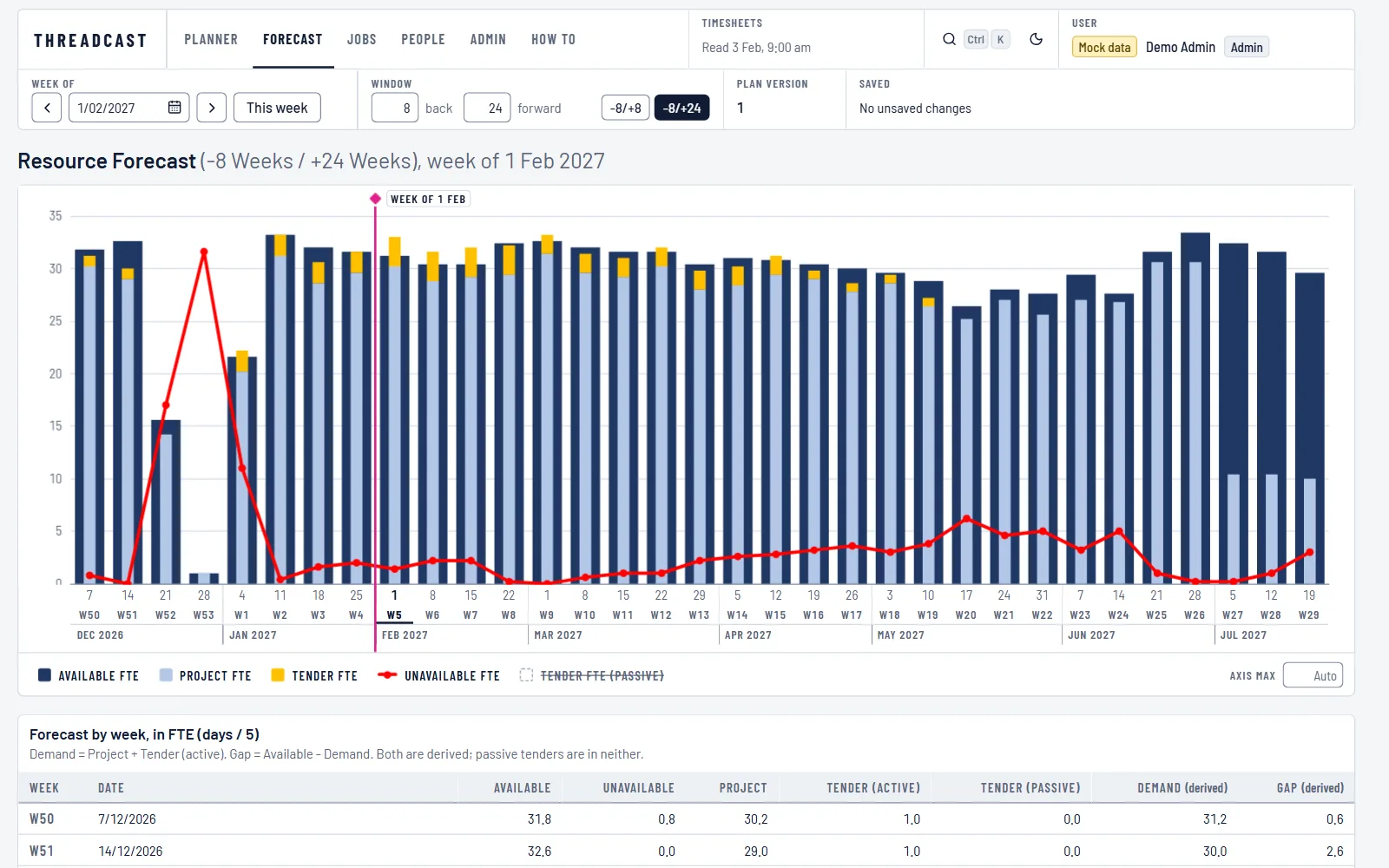
Available, project, tender and unavailable full-time equivalents (FTE) week by week for any window, as the chart docked under the planner and larger on its own screen with the weekly table. Demand and gap are derived, never typed, and a passive tender counts in neither.
Warnings
A line over the grid counts what needs a look in the weeks on screen, which is anyone over-allocated, over five days, booked during leave, outside capacity or planned after a job ends. Each count leads to the next cell that carries it, and the cell says why.
The plan against the hours logged
A count of people whose plan and timesheets have parted, with the list of who, on which job, the days planned against the days logged week by week. The plan forward is questioned against what actually happened, not against itself.
Roll-off
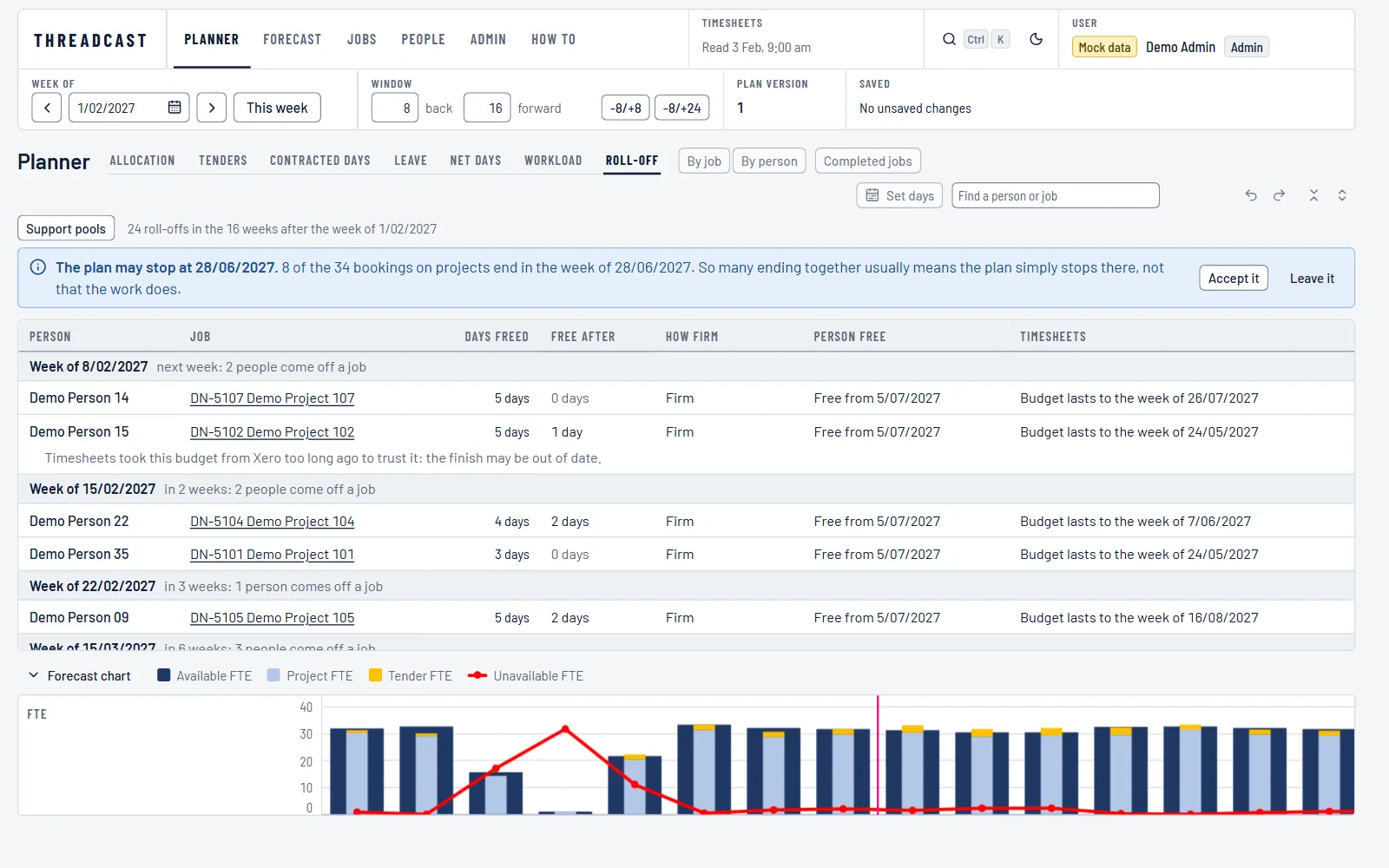
When each person finishes each job and comes free, week by week, with how firm the date is and how long the job's budget lasts. A plan that runs past its budget, a budget that outlasts the plan and a finish that rests on pencilled days are each flagged.
Timesheet feed
A nightly read of people, jobs, assignments, hours, budgets and leave. What is left of a job's budget is spread forward over the people on it at the rate they have been working, pencilled in until a planner types over it or keeps it.
Jobs, tenders and people
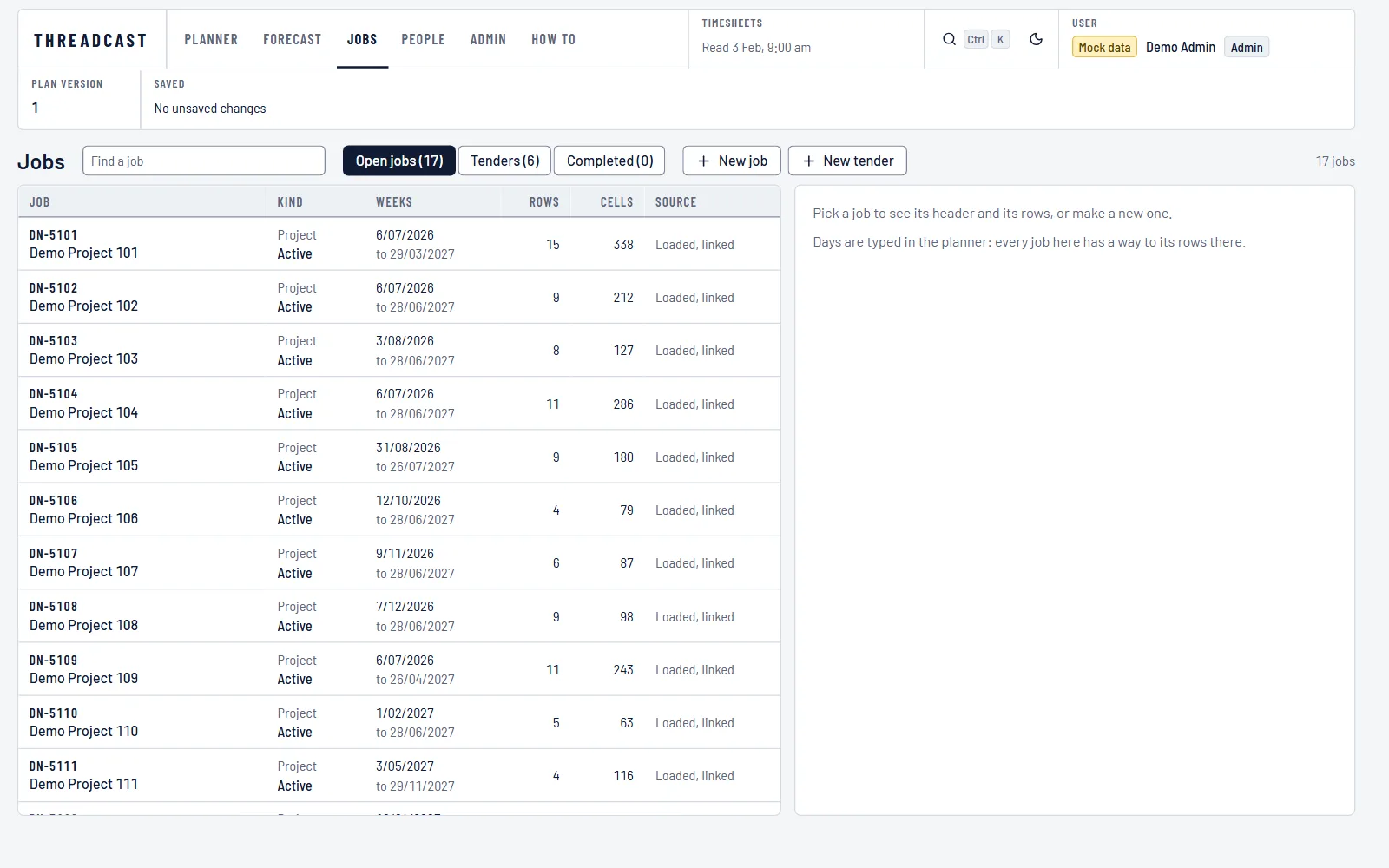
Jobs and tenders with their rows, a won tender turned into a project, a lost one kept as history, a need with no name yet as a role row rather than a made-up person, two records of one person merged, and a finished job closed rather than removed.
Roles and history
Admin, planner and viewer roles from the organisation's directory sign-in. A viewer sees who is on which job and never anyone's leave, contracted days or employment dates. Every change records who made it, and the history reads back in the planner's own words.
What it looks like
How it is built
- One calculation engine. The business rules are a pure library with no dependencies, pinned on every build by golden files generated from a fictional dataset, so the chart, the table and the grid totals cannot disagree.
- Business rules are settings. The conventions the planning spreadsheet used are the starting configuration, and a change of convention changes a setting, not the code.
- Speed is designed in. Weekly totals are kept ready on the server, unchanged data is answered with not modified, each screen is its own download, and the build fails when the first download grows past its budget. The plan has been measured at three times its intended size and with ten planners editing at once.
- Sign-in through the organisation's directory with a same-origin cookie session and no tokens in the browser. One role policy on every route, and nothing personal kept in the browser's storage.
- Staff data is protected by design. What a viewer may not see is removed on the server, not hidden on the screen. A retention purge is built in. The repository, tests, seeds and screenshots carry only a fictional dataset.
- An automated accessibility check runs over every screen state, and the keyboard carries every action in the grid.
Integrations
A resource plan is only trustworthy if it starts from what is already true. ThreadCast reads the systems that know who is employed and what has been worked, and keeps the forward plan as the one thing it owns.
What connects today
Timesheet and leave system
A nightly read of people, jobs, who works on them, hours logged, job budgets and approved leave, through a small read-only interface whose shape ThreadCast documents. The feed holds back a run that would switch off too many people at once, and a missed night is caught up.
Directory sign-in
Microsoft Entra ID with three application roles. Named people hold admin and planner, and every other sign-in in the organisation becomes a viewer without being set up one by one.
What we could add
- A different timesheet, payroll or ERP system as the source of people, jobs and hours, through the same read interface.
- Job budgets and quotes read from the accounting system, so a budget's finish is read rather than typed.
- Exports of the forecast and the roll-off list for board and management packs.
How you can run it
- A private deployment for each business, hosted by Enco in Australia or in your own environment, with sign-in through your Microsoft directory.
- Built first for Enco's own engineering team, so the rules it enforces are the ones a consulting firm lives by. Whole days, the next eight weeks exact and the next six months rough, and a plan corrected the day the facts change.
- Set up with your positions, your jobs and your people, and connected to your timesheet system through its read interface. Where no such interface exists, people and jobs are entered on the screens built for it.
- Supported by the engineers who wrote it, with the calculation engine, every route's authorisation and every screen state under automated test.
See it working, then decide
The quickest way to judge it is a walkthrough on real workflows. Tell us what your team runs today and we will show you where this fits, or where a custom build fits better.